

Bandayd — SMS Opt-in Flow
These are the screens where a user of the Bandayd app agrees to receive text messages. Two of them are only visible after signing in, so each is reproduced here with its exact live wordingand the address of the live screen. The consent language, frequency, rates and STOP/HELP terms are highlighted in red. Full program terms: https://bandayd.com/sms-consent. A screenshot of this page: opt-in-flow.png.
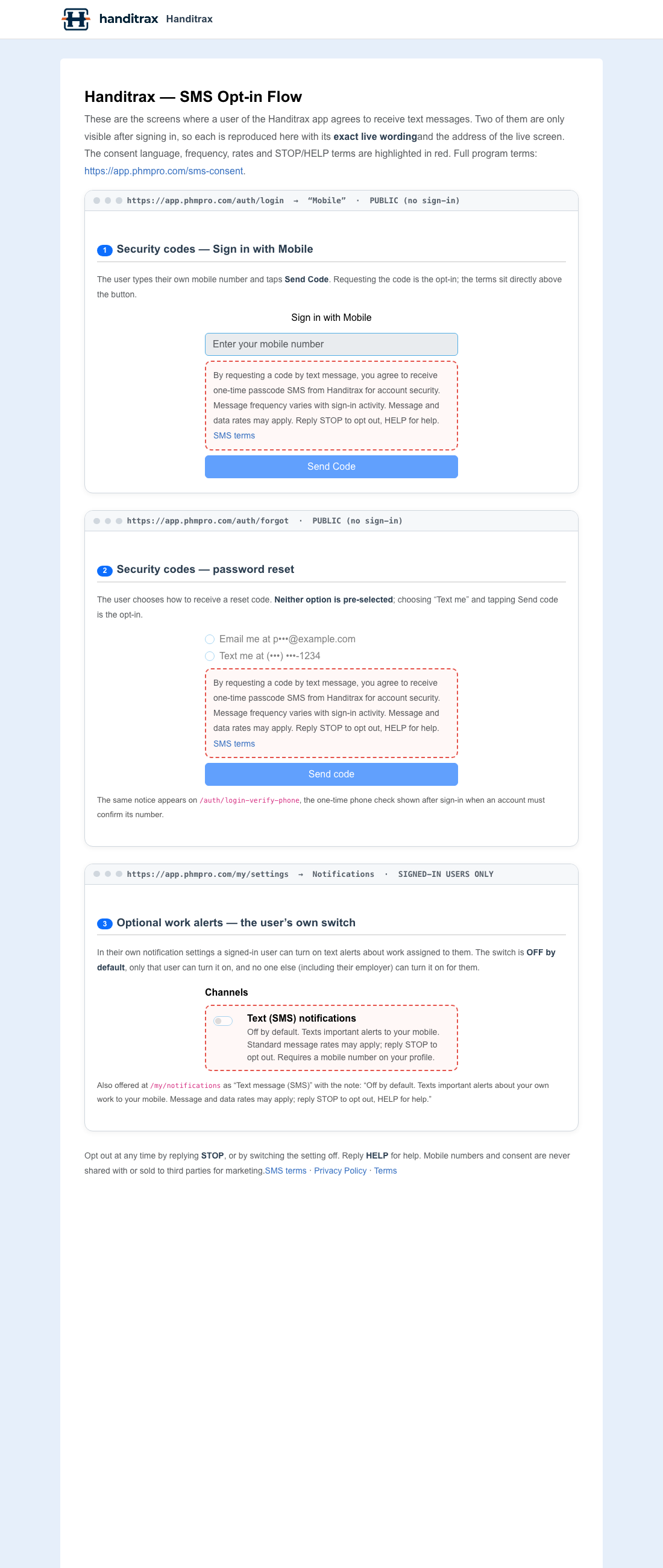
1Security codes — Sign in with Mobile
The user types their own mobile number and taps Send Code. Requesting the code is the opt-in; the terms sit directly above the button.
Sign in with Mobile
By requesting a code by text message, you agree to receive one-time passcode SMS from Bandayd for account security. Message frequency varies with sign-in activity. Message and data rates may apply. Reply STOP to opt out, HELP for help. SMS terms
2Security codes — password reset
The user chooses how to receive a reset code. Neither option is pre-selected; choosing “Text me” and tapping Send code is the opt-in.
By requesting a code by text message, you agree to receive one-time passcode SMS from Bandayd for account security. Message frequency varies with sign-in activity. Message and data rates may apply. Reply STOP to opt out, HELP for help. SMS terms
The same notice appears on /auth/login-verify-phone, the one-time phone check shown after sign-in when an account must confirm its number.
3Optional work alerts — the user’s own switch
In their own notification settings a signed-in user can turn on text alerts about work assigned to them. The switch is OFF by default, only that user can turn it on, and no one else (including their employer) can turn it on for them.
Also offered at /my/notifications as “Text message (SMS)” with the note: “Off by default. Texts important alerts about your own work to your mobile. Message and data rates may apply; reply STOP to opt out, HELP for help.”
Opt out at any time by replying STOP, or by switching the setting off. Reply HELP for help. Mobile numbers and consent are never shared with or sold to third parties for marketing.SMS terms · Privacy Policy · Terms